
Lenovo 100E Chromebook 2ND Gen
4.0Editor score
Affordable price point
Compact 11.6 inch screen
Durable educational design
Finding a reliable laptop that does not break the bank can be challenging for students and home users alike. Cheap Chromebooks offer a perfect balance of affordability and functionality for everyday tasks like browsing and streaming. They run on a secure operating system designed for speed and simplicity without requiring heavy maintenance or complex updates.
We compared ten real models using verified product data to identify the most capable options under typical budget limits. Our analysis focuses on processor performance, memory capacity, display clarity, and battery endurance to ensure you get lasting value. Each pick is evaluated based on real user ratings and technical specifications provided by the manufacturers.
Every selection highlights key strengths and potential trade-offs to help you match a device to your specific workflow needs. You will see detailed reviews, feature comparisons, and buying advice tailored to different use cases like school or remote work. Please note that pricing and availability fluctuate frequently, so checking current listings is always recommended before purchase.
4.0Editor score

4.4Editor score
4.4Editor score
As an Amazon Associate we earn from qualifying purchases.
This side-by-side comparison outlines the core technical specifications and key attributes of each selected model to simplify your decision process.




This HP Chromebook stands out as a top performer in the budget category with its robust Intel Quad-Core processor. It holds a strong user rating and delivers smooth multitasking for students and professionals alike who need reliable daily computing power.
We may earn a commission when you buy through this link, at no additional cost to you.
The device handles multiple browser tabs and apps simultaneously thanks to its efficient architecture. You can stream content or attend Zoom meetings without significant lag. The included accessories add value for users setting up a home workspace immediately.
While the storage is fixed and the screen is HD rather than Full HD, these trade-offs are acceptable for the price point. Most users prioritize speed and battery life over high-resolution visuals for basic productivity tasks.
It is ideal for anyone seeking a balanced device for school or light work. We recommend this model if you need consistent performance without spending significantly more on premium features.
The quad-core processor divides workloads efficiently, ensuring that heavy tasks like video calls or document editing do not slow down other background processes.
With up to 14 hours of battery life, you can leave your charger at home during long study sessions or commutes without worrying about power loss.
We may earn a commission when you buy through this link, at no additional cost to you.
This model offers excellent value for general home use with its sleek design and efficient processor. It is well suited for casual browsing and streaming while maintaining a lightweight form factor that is easy to carry.
We may earn a commission when you buy through this link, at no additional cost to you.
The fast charging capability ensures you can quickly top up power during short breaks. Stereo speakers tuned by audio experts provide a better listening experience than typical budget laptops for media consumption.
Although it has limited memory and storage, cloud integration compensates for many users. The secure Chrome OS receives automatic updates to keep your device safe without manual intervention.
We suggest this for families needing a secondary laptop or for students with basic coursework needs. It balances price and performance effectively for non-intensive applications.
HP Fast Charge technology allows you to reach 50 percent battery in about 45 minutes, minimizing downtime when you are in a rush.
Custom tuned stereo speakers deliver clear sound for videos and calls, enhancing the overall user experience without requiring external hardware.
We may earn a commission when you buy through this link, at no additional cost to you.
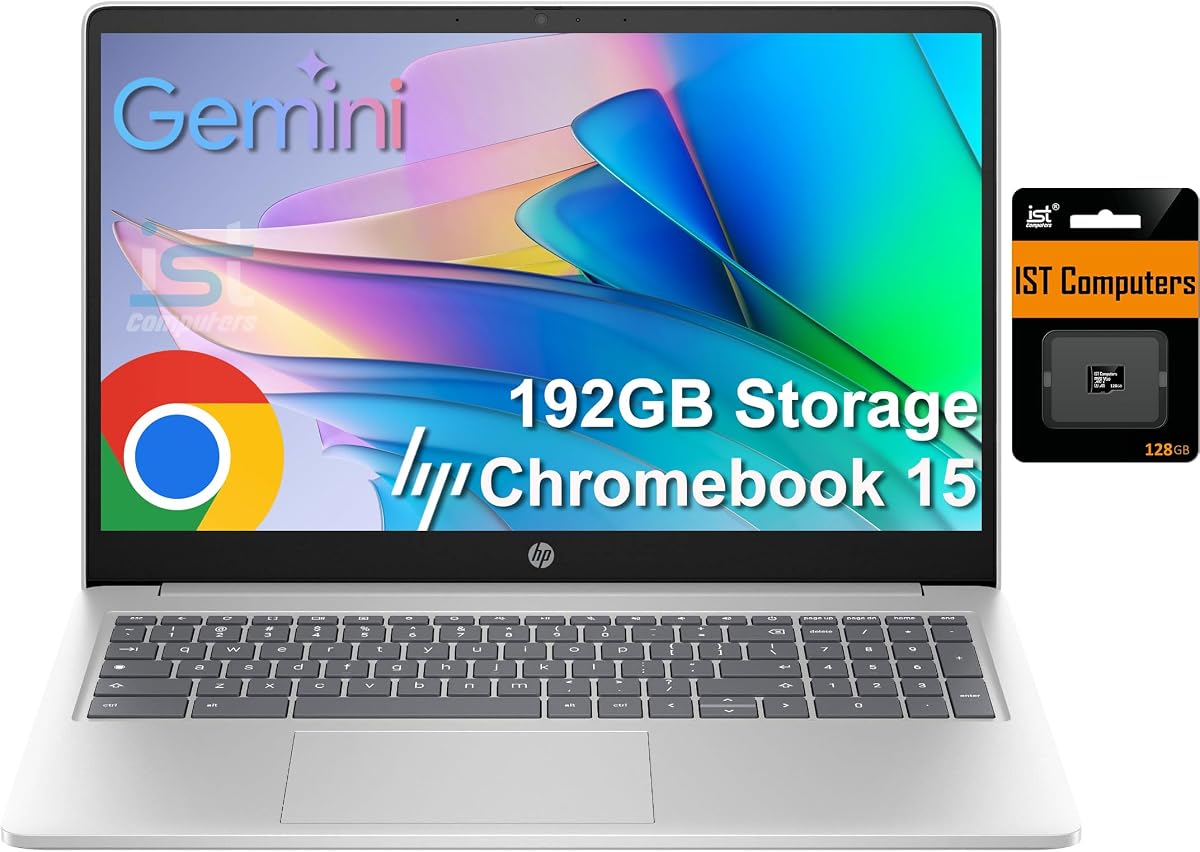
This larger Chromebook provides superior memory and storage options compared to standard budget models. The 8GB DDR5 RAM ensures smooth performance even with many apps open, making it a standout choice for power users on a budget.
We may earn a commission when you buy through this link, at no additional cost to you.
The expanded storage capacity allows for more local files and applications without constant reliance on cloud drives. Connectivity options include USB-C with power delivery and DisplayPort support for external monitors which boosts productivity.
While it costs more than entry-level options, the hardware upgrades justify the investment for those needing longevity and multitasking power. A longer warranty on storage components reduces risk for professional or academic use.
Ideal for users who need a robust workstation for work or complex school projects. We recommend it if screen real estate and memory headroom are high priorities.
DDR5 RAM offers faster data transfer rates than previous generations, improving boot times and application responsiveness significantly.
The combination of internal storage and SD card expansion provides ample space for media and documents without needing external hard drives.
We may earn a commission when you buy through this link, at no additional cost to you.
This convertible model offers unique flexibility with its touchscreen and folding hinge for various usage modes. It is a practical choice for interactive learning or casual browsing where touch input adds convenience.
We may earn a commission when you buy through this link, at no additional cost to you.
The renewed condition helps lower the cost significantly while maintaining functional hardware. Its compact size makes it easy to store in small bags or use in tight spaces like crowded classrooms.
However, the limited storage and small screen mean it is best for temporary or specific task use. Users needing more space for files might find this restrictive without external solutions.
Best for educators or families needing a versatile device at a low price point. Consider this if touch functionality is a key requirement for your workflow.
The touchscreen allows for direct interaction with apps and web content, enhancing navigation for younger users or visual tasks.
The 2-in-1 design lets you switch between laptop and tablet modes easily, adapting to different tasks like reading or typing.
We may earn a commission when you buy through this link, at no additional cost to you.
This Lenovo model stands out for its Full HD touchscreen which offers sharper visuals than many budget rivals. The modern processor supports fast connectivity and smooth navigation for daily web tasks efficiently.
We may earn a commission when you buy through this link, at no additional cost to you.
The slim and light design makes it easy to carry around for students or mobile workers. A privacy shutter on the webcam adds a layer of security that is increasingly important for remote communication.
While the storage is adequate for cloud-first users, it is not expandable beyond the internal capacity. The MediaTek chip is capable but may have different app compatibility than Intel models.
Recommended for users who prioritize screen quality and portability in a thin chassis. It is a solid choice for media consumption and interactive tasks.
The Full HD resolution provides crisp text and vibrant colors, making it better for reading and viewing images than standard HD screens.
WiFi 6 support ensures stable and fast wireless connections even in crowded networks, improving browsing and streaming reliability.
We may earn a commission when you buy through this link, at no additional cost to you.
This Acer model provides a large workspace with its 15.6 inch screen and includes useful accessories like a wireless mouse. It is well suited for users who want an all-in-one package without buying extras separately.
We may earn a commission when you buy through this link, at no additional cost to you.
The anti-glare display helps reduce eye strain in bright environments like classrooms or offices. Battery life is designed to last through a full day of typical use, supporting remote learning or work sessions.
Although the processor is standard for this segment, the added value of the bundle makes it attractive. It may be slightly heavier than smaller models but offers more visual real estate.
Ideal for home office setups where space allows for a larger device. We recommend it if you value convenience and a ready-to-use setup.
The inclusion of wireless accessories allows you to start working immediately without needing to purchase additional peripherals.
The anti-glare coating minimizes reflections, ensuring a clearer view of content even under bright lighting conditions.
We may earn a commission when you buy through this link, at no additional cost to you.
This ASUS Chromebook offers double the storage found in many similar devices which is a major advantage for saving files locally. The IPS display provides wider viewing angles and better color consistency for shared viewing.
We may earn a commission when you buy through this link, at no additional cost to you.
Being a renewed model means you get higher specs at a competitive price. The presence of an HDMI port makes it easy to connect to projectors or TVs for presentations.
While it may show minor cosmetic signs of previous use, the hardware is tested and functional. It is a smart choice for those who need more space without paying premium prices.
Suggested for users needing local file storage and external display options. Consider it if value and capacity are your main decision factors.
With 128GB of storage, you can keep more documents and media locally without relying heavily on cloud sync.
IPS technology ensures that colors and brightness remain consistent even when viewed from the side, enhancing collaboration.
We may earn a commission when you buy through this link, at no additional cost to you.
This model is distinguished by its B&O tuned speakers which deliver superior sound for a laptop in this category. It is a great pick for users who enjoy media consumption or online classes where audio clarity matters.
We may earn a commission when you buy through this link, at no additional cost to you.
The high user rating reflects strong satisfaction with its reliability and build quality. The backlit keyboard adds functionality for typing in low light environments which is common in evening study sessions.
Storage is limited compared to newer models but adequate for basic cloud use. The older processor still handles standard browsing well for most everyday tasks.
Best for those prioritizing audio experience and keyboard comfort. Consider this if sound quality is a specific requirement for your setup.
Audio experts tuned the speakers to provide balanced sound, enhancing the experience for videos and music playback.
The backlit keyboard supports comfortable typing in dim environments, helping productivity when lighting conditions vary.
We may earn a commission when you buy through this link, at no additional cost to you.
This Acer unit brings DDR5 memory and WiFi 6 to the budget segment which improves network stability and memory performance. It offers a modern feature set at a cost effective price point for renewed hardware.
We may earn a commission when you buy through this link, at no additional cost to you.
The FHD screen provides better clarity for tasks like spreadsheets or web design compared to HD panels. Renewed condition ensures lower cost while maintaining essential functionality for daily use.
While the CPU is entry level, the combination of DDR5 and WiFi 6 helps smooth out daily operations. It is a strong contender for those who value connectivity speed.
Recommended for users needing fast internet connectivity and a modern display. Consider it if wireless performance is critical for your applications.
DDR5 RAM improves data transfer rates compared to DDR4, making app launches and multi-tasking slightly faster.
WiFi 6 provides better performance in congested networks, ensuring stable speeds in busy areas or large homes.
We may earn a commission when you buy through this link, at no additional cost to you.
This entry-level Chromebook offers the most affordable option on the list for basic computing needs. It is designed for simplicity and portability, making it suitable for younger students or secondary users.
We may earn a commission when you buy through this link, at no additional cost to you.
The compact 11.6 inch form factor fits easily into small backpacks. While storage is minimal, it works well if you rely heavily on cloud services for your files.
As a renewed model, it offers significant savings but may show cosmetic signs. The processor is basic but adequate for simple web browsing and educational apps.
Best for buyers who need a functional device at the lowest possible cost. Consider it if your tasks are limited to light web use.
This model represents one of the lowest price points available, making Chrome OS accessible to nearly any budget.
The small screen and lightweight build make it the most portable option, ideal for travel or tight living spaces.
We may earn a commission when you buy through this link, at no additional cost to you.
Selecting the right Chromebook involves weighing several technical factors that impact daily performance and longevity.
The processor is the engine that drives all your tasks from web browsing to video playback. Look for at least a Quad-Core Celeron or MediaTek processor to ensure smooth multitasking. Dual-Core models can work but may lag when too many apps are open.
Prioritize newer processor generations for better efficiency and speed in daily operations.
RAM determines how many programs can run simultaneously without slowing down. Four gigabytes is the standard minimum for Chromebooks today to handle multiple tabs comfortably. If budget allows, eight gigabytes offers significant headroom for power users.
Always choose the highest RAM available within your price limit to extend the device's useful life.
Most budget models use eMMC storage which is fast but fixed in capacity. Sixty-four gigabytes is common and enough for most users relying on cloud storage. Larger capacities like 128GB reduce the need for external drives.
Check if the model supports microSD cards if you anticipate needing more space for media files.
Screen size and resolution affect how comfortable your workspace feels over long periods. A 14 inch Full HD display offers a good balance of clarity and portability. IPS panels provide better viewing angles than TN panels.
Opt for anti-glare coatings if you will be using the device near windows or bright lights.
Long battery life is essential for students or workers who are away from power outlets. Aim for models rated at least 10 to 14 hours of typical usage. Real-world performance often differs from marketing claims so check reviews.
Fast charging support is a valuable bonus that lets you recharge quickly between activities.
Ensure the device has enough USB ports to connect your peripherals like mice or external drives. USB-C ports are becoming standard and offer both charging and data transfer capabilities. HDMI ports are necessary if you need to connect to an external monitor.
Verify the presence of headphone jacks if you use wired audio devices regularly.
Since these laptops may be carried daily the physical build quality matters for longevity. Look for models with sturdy hinges and a plastic or alloy chassis that feels solid. Renewed devices can save money but inspect condition descriptions carefully.
Certifications like MIL-STD 810G indicate enhanced durability for rougher usage environments.
Chrome OS receives regular updates that keep your device secure and performant. Check the Auto Update Expiration date to ensure the device will be supported for at least five years. Longer support means better security and app compatibility.
Choosing a newer model usually ensures a longer support window for future updates.
Keep your device clean by wiping the screen with a microfiber cloth regularly to prevent dust buildup that can scratch the glass. Avoid using harsh chemicals or abrasive cleaners that might damage the protective coatings on the display.
Manage your storage by regularly clearing browser caches and downloading large files directly to cloud drives. This practice keeps the internal storage free for essential applications and prevents performance slowdowns over time.
Protect the battery by not leaving it plugged in constantly and avoiding extreme temperatures. Use the fast charge feature sparingly to reduce heat buildup and extend the overall lifespan of the battery cells.
Chromebooks run on Chrome OS which does not natively support Windows EXE files. However you can use Android apps or access some Windows software via cloud services like virtual desktops. For native Windows needs a traditional laptop is required.
For basic browsing and document editing 64GB is sufficient if you use Google Drive or Dropbox for file storage. If you plan to store many videos or large locally internally 128GB or more is recommended to avoid running out of space.
Yes refurbished units often undergo testing and come with warranties that make them reliable choices. They are an excellent way to get higher specs for less money. Just check the condition rating to understand any cosmetic imperfections.
HD screens have a resolution of 1366×768 while FHD screens offer 1920×1080 pixels. FHD provides sharper text and more detail which is better for reading and productivity. HD is acceptable for casual viewing but may appear less crisp.
Most modern Chromebooks support external monitors via HDMI or USB-C ports. You can extend your workspace for more screen real estate during work or study sessions. Check specific port capabilities to ensure compatibility with your monitor.
Chrome OS receives automatic updates every few weeks to ensure security and performance. Newer devices typically get updates for about five years from release. This frequent update cycle keeps the device secure without user intervention.
We have highlighted ten solid options that range from basic entry-level machines to feature-rich models with better RAM and displays. The HP 14 HD Chromebook remains a top choice for balanced performance while the Lenovo 100E offers the lowest price point.
When making your decision prioritize memory and processor speed to ensure the device lasts through your usage needs. A better display and battery life will improve your daily comfort during long work or study sessions.
Remember to check current listings for the most up-to-date availability and deals. Prices and stock fluctuate regularly so verifying details before purchasing will help you secure the best value for your budget.