
Game Console Cooling Fan Efficient Heat Dissipation Dock
USB powered design
Compact space saving
White aesthetic match
This guide compares the top cooling fan Nintendo Switch Dock options to help you keep your console cool and prevent overheating during intense gaming sessions.
Maintaining optimal operating temperatures is crucial for your gaming console's longevity. A dedicated cooling fan Nintendo Switch Dock accessory helps dissipate heat efficiently during extended play sessions.
We analyzed ten highly rated products based on fan speed, noise levels, build quality, and user feedback. This list covers diverse needs from budget options to premium feature-rich stands.
Each pick shows key specifications and real-world performance insights. Prices and availability change frequently so verify current details before purchasing your preferred accessory today.

4.6Editor score

4.0Editor score
This side by side comparison highlights the key features and performance metrics of each selected cooling fan designed for the Switch dock ecosystem.




This top ranked cooling fan stands out for its comprehensive feature set designed specifically for the original Switch dock. With a robust 4.6 rating users appreciate the real time temperature feedback it provides during play. The inclusion of a digital display sets it apart from basic fans offering true visibility into console health.
We may earn a commission when you buy through this link, at no additional cost to you.
The standout quality lies in its adjustable speed control ranging from 510 to 6000 RPM. This flexibility allows users to balance noise and cooling power effectively. The fixed pad ensures the unit stays securely between the console and dock base preventing accidental movement while gaming.
While the micro USB cable is reliable it can sometimes create clutter depending on your dock setup. The noise level increases at top speeds though this is expected for high airflow performance. These trade offs are minimal compared to the thermal protection benefits it offers.
Gamers seeking maximum control over their console temperature should prioritize this model. It delivers professional level monitoring features usually found in expensive desktop coolers. For those wanting peace of mind during marathon sessions this fan is the clear recommendation.
The LED display shows current fan RPM and exhaust temperature in Celsius allowing you to react to heat spikes instantly.
Three physical buttons let you power the unit on or off and adjust speed increments without needing external software.
We may earn a commission when you buy through this link, at no additional cost to you.
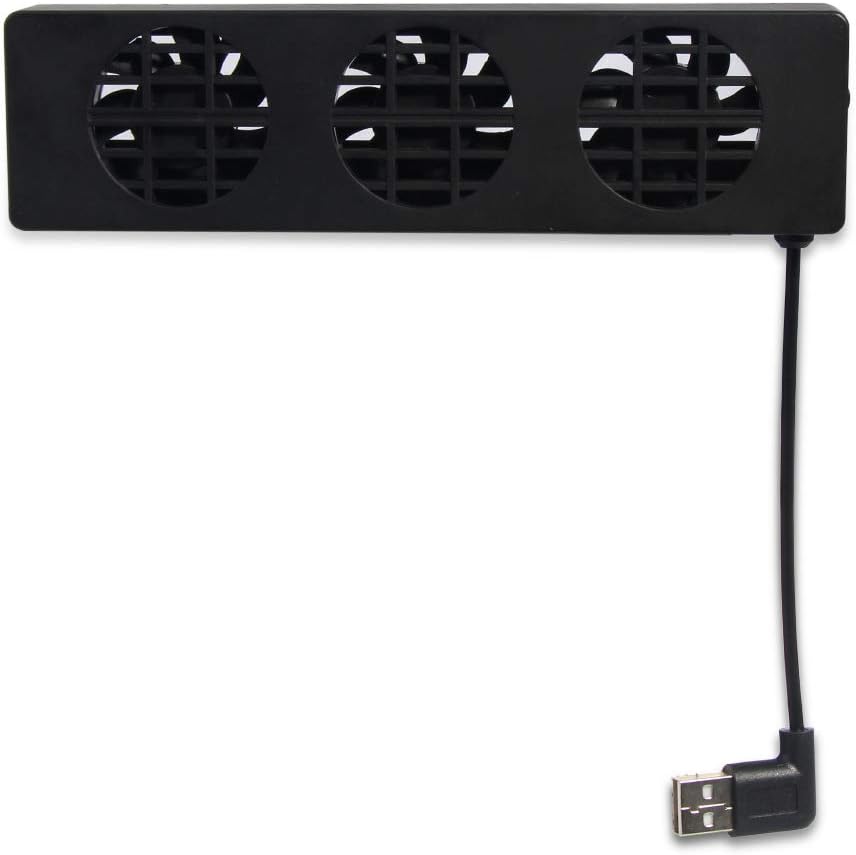
This accessory focuses on delivering strong ventilation through its trio of built in fans. It targets the original Switch dock specifically ensuring a snug fit and efficient airflow directly over the heat exhaust. Users value its straightforward design that requires no tools to install.
We may earn a commission when you buy through this link, at no additional cost to you.
The main strength is the ability to switch between turbo and normal modes depending on game intensity. For lighter titles normal mode keeps things quiet while turbo engages when heat generation spikes. The compact form factor ensures it does not block surrounding ports or cables.
However some users report noise levels become noticeable at maximum speeds which might bother those with audio sensitive setups. The lower rating suggests occasional quality variance though most report success. It remains a practical choice for those needing extra airflow without complexity.
If you want a straightforward cooling solution that works well for extended gaming you will find this useful. It effectively lowers console temperatures to prevent unexpected shutdowns. Just ensure you have access to a free USB port on your dock for power.
Three dedicated cooling fans work together to create a high volume airflow path that rapidly reduces internal console heat.
Installation involves inserting the unit onto the back of the dock and connecting the cable to the USB port.
We may earn a commission when you buy through this link, at no additional cost to you.
This stand represents a premium option designed for the next generation Switch dock with enhanced connectivity and style. It features dual fans that automatically engage upon connection ensuring baseline cooling without user input. The RGB lighting adds a personalized touch to the setup.
We may earn a commission when you buy through this link, at no additional cost to you.
Key strengths include the generous six game card slots and three additional USB ports for peripherals. This transforms the cooling fan into a hub reducing clutter on your entertainment center. The three stage adjustment allows fine tuning based on your specific thermal needs.
The higher price reflects the added utility of extra ports and storage. While not compatible with the original dock it is a future proof investment for those upgrading. Some users may find the RGB distracting but it can be turned off easily.
Gamers who value connectivity and organization should consider this stand for its versatile functionality. It offers cooling plus significant storage expansion. If you want a complete docking solution that looks cool this model delivers high value.
Three USB output ports allow you to charge controllers and headsets simultaneously without needing extra cables.
Nine vibrant RGB modes let you change the ambient lighting to match your mood or game scene.
We may earn a commission when you buy through this link, at no additional cost to you.
Designed exclusively for the 2021 OLED dock this unit offers massive storage with fourteen card slots on top. The blue light accent matches the OLED aesthetic making it look like a cohesive part of the console. It provides efficient heat dissipation through directed airflow.
We may earn a commission when you buy through this link, at no additional cost to you.
Its strongest asset is the storage capacity which accommodates a large library of physical games easily. The Type C cable ensures a secure connection to the OLED dock port. The ABS material keeps the unit lightweight yet sturdy enough for daily use.
The blue light is a fixed feature which some may find less flexible than RGB options. Power delivery relies on the Type C port which is standard for OLED users. Overall it balances form and function well for owners of this specific model.
If you own an OLED model and need extensive card storage this fan is ideal. It keeps the system cool while organizing your collection efficiently. The seamless design ensures it complements rather than clashes with your hardware.
Fourteen slots allow you to keep your entire collection accessible right on top of the cooling base.
The design matches the dimensions of the official OLED base ensuring a perfect fit without wobbling.
We may earn a commission when you buy through this link, at no additional cost to you.
This accessory provides a minimalist approach to cooling with a clean white finish that matches the OLED system. It uses a single high speed fan to drive internal airflow quickly without generating excessive noise. The lighting effect syncs with the fan power state for consistency.
We may earn a commission when you buy through this link, at no additional cost to you.
Key strengths include its quiet performance which is vital for handhelds or media environments. The power connection through the Type C header on the original adapter makes setup effortless. You can toggle it on or off instantly with a side switch.
The unit lacks card slots making it purely a cooling device. While adequate for thermal management it does not offer organizational perks. Some users may prefer more customization but simplicity is its main selling point.
If you want a no fuss solution that matches your console color you will appreciate this. It delivers solid cooling silently. For those prioritizing aesthetics and low noise over extra features this is a strong choice.
The high speed fan is engineered to maximize airflow while maintaining a low noise profile for quiet environments.
A single physical switch lets you activate the cooling instantly without navigating menus.
We may earn a commission when you buy through this link, at no additional cost to you.
This budget friendly option delivers fast cooling through a 3000 RPM fan designed for efficiency. It is specifically tailored to fit the white OLED dock aesthetic perfectly. Users looking for a basic solution without extra cost will find this value packed.
We may earn a commission when you buy through this link, at no additional cost to you.
The main advantage is its affordability combined with decent thermal performance. It attaches simply to the USB port requiring no additional power bricks. The compact size ensures it does not overwhelm your entertainment setup visually.
Noise levels remain controlled and the blue LED adds a touch of style. However it lacks advanced features like speed adjustment or storage slots. For straightforward heat management it serves its purpose well without breaking the bank.
If you need an immediate cooling fix at a low price point this is highly recommended. It keeps your system running smoothly without expensive add ons. Just ensure your dock has an available USB slot for power.
The fan accelerates airflow directly over the heat sink to lower temperatures quickly during intense play.
Its slim profile keeps your setup tidy while providing essential protection against overheating.
We may earn a commission when you buy through this link, at no additional cost to you.
This unit focuses on raw ventilation power through three internal fans that effectively dissipate heat. It is built with superior material for durability and includes a switch to toggle between turbo and normal speeds. The small design ensures it is easy to store when not in use.
We may earn a commission when you buy through this link, at no additional cost to you.
Its strength lies in balancing performance with physical robustness. Users report it keeps consoles cool during heavy gaming without excessive noise. The side switch provides immediate control without fumbling for settings on a display.
Lack of a display means you rely on feel rather than data. This simplifies operation but reduces visibility. For those who just want cooling it is sufficient but tech enthusiasts may prefer telemetry features.
Gamers needing reliable heat reduction without frills should consider this stand. It offers proven performance in a compact frame. The material quality ensures it withstands daily handling without issues.
Installation is straightforward with a design that fits directly onto the dock for immediate use.
Built with superior materials that resist wear and tear from frequent handling and transport.
We may earn a commission when you buy through this link, at no additional cost to you.
This fan unit increases airflow to the console quickly to reduce temperature effectively. It uses three built in fans and a speed switch to adapt to different game loads. Its portable size makes it easy to carry or store in a bag.
We may earn a commission when you buy through this link, at no additional cost to you.
The primary benefit is the significant increase in air exchange at a low price. You can choose normal speed for casual play or turbo for intensive sessions. The USB port power means no extra bricks are needed to run it.
Build quality may be less robust than premium options and high speed noise can be noticeable. However it gets the job done for those needing immediate help. It is a practical fix for older units struggling with heat.
If you need a basic cooling fix without spending much this will work. It prevents overheating effectively. Just keep an eye on the noise levels if you play in quiet spaces.
The design promotes rapid heat exchange allowing the console to maintain safe temperatures over time.
Its lightweight and compact shape makes it easy to transport along with your console.
We may earn a commission when you buy through this link, at no additional cost to you.
This model fits perfectly with the original dock station to lower operating temperature reliably. It includes an LED display showing real time RPM and exhaust temperature for clarity. Three physical buttons support quick adjustments to your cooling needs.
We may earn a commission when you buy through this link, at no additional cost to you.
Strengths include the broad RPM range that balances quiet performance with powerful heat dissipation. It includes a fixed stabilizer pad to prevent scratching and joystick caps as bonuses. The USB powered design keeps things simple for most setups.
Some users might find the cable management slightly tricky depending on cable length. The price is higher than basic fans but justified by the telemetry features. It provides reliable protection against overheating during long sessions.
If you value data and customization this fan offers a great balance. It suits both OLED and traditional models well. For gamers wanting precise control over thermal performance this unit is highly effective.
The LED screen keeps you informed about exact fan speed and exhaust temperature to monitor console health.
The included sponge pad ensures the console stays stable and prevents scratches during operation.
We may earn a commission when you buy through this link, at no additional cost to you.
This premium option is designed specifically for the OLED model offering high quality cooling in a sleek black finish. It focuses on maintaining optimal temperatures without adding bulk to your setup. Users appreciate its sturdy construction and precise fit.
We may earn a commission when you buy through this link, at no additional cost to you.
Its key strength is the reliability and finish quality that matches official Nintendo accessories. It fits seamlessly onto the dock and works quietly to dissipate heat. The black color ensures it blends in with dark setups.
The Japanese title may confuse some buyers but the product works universally with compatible docks. The price reflects its premium nature but offers peace of mind regarding build standards. It is a solid choice for those prioritizing quality.
If you want a premium looking accessory that works flawlessly with your OLED this is recommended. It balances aesthetics with function. For collectors or enthusiasts seeking the best finish this fan delivers.
The high quality build matches the official OLED dock to maintain a cohesive look.
Designed to deliver consistent cooling results that protect your console over the long term.
We may earn a commission when you buy through this link, at no additional cost to you.
Selecting the right cooling fan requires considering compatibility, noise levels, and extra features that fit your gaming habits.
Ensure the fan is designed specifically for your Switch version whether original OLED or Switch 2. Some units fit only original docks while others target OLED or future models. Using an incompatible fan may result in poor fit or no power delivery.
Higher RPM ratings generally mean better heat dissipation but also more noise. Look for adjustable speeds so you can use quiet low settings for casual play and turbo for intense sessions. Aim for a range that allows flexibility.
Most fans draw power from the dock's USB port via Micro USB or Type C cables. Check that your dock has a free port available. Units needing external power bricks add clutter and are less convenient to use daily.
Noise can be distracting during media playback. Look for models described as quiet at lower speeds. Many units operate silently below 2400 RPM so consider if high speed modes will be used frequently.
Durable ABS or metal housing resists wear and prevents scratches on your console. Check for anti slip pads or stabilizers included in the package. High quality materials ensure longevity and a secure fit on the dock.
Features like LED displays, RGB lighting, or game card slots add value. Telemetry helps monitor temps while storage keeps controllers handy. Decide which extras matter most to your workflow before buying.
Prices vary from budget options to premium multi feature stands. A warranty ensures you can replace units if defective. Prioritize reliability and service over minor price differences when investing in hardware protection.
Look for designs that require no tools to install. Simple insert and plug setups save time. Ensure the unit fits snugly without blocking HDMI or power ports for hassle free operation.
Connect the fan cable securely to the dock USB port before starting games. Ensure the unit is seated firmly against the dock base to prevent vibration.
Use the physical buttons to power on the unit before gameplay starts. If your model has adjustable speeds set it to normal for regular play.
Clean the fan blades periodically with compressed air to remove dust buildup. Check cables for wear and store the unit in a dry place when not in use.
No the fan helps maintain stable temperatures which prevents thermal throttling and system crashes. It supports consistent performance during long sessions by keeping the console cool. This is especially useful for demanding games that generate excess heat.
Yes most modern units have protection circuits against power surges. They consume minimal energy and draw power only when active. Leaving them connected is generally safe provided cables are not damaged.
It depends on the dock design and USB port availability. Official or high quality third party docks usually work best. Non official units may vary in fit and power delivery so test carefully before purchasing.
No these accessories attach specifically to the docking station for console mode. They do not cool the device in handheld mode which relies on internal vents. For handheld use ensure adequate ventilation around the console.
Use short bursts of compressed air to blow dust out of the vents and blades. Do not touch the fan blades directly with hands to avoid damage. Regular maintenance keeps the fan running smoothly and quietly.
This could mean dust is blocking internal vents or the fan speed is too low. Check that your console is placed in a well ventilated area. Ensure the fan is powered on and working correctly via the LED display.
We highlighted ten top rated options with the Cooling Fan for Nintendo Switch 1/2 leading as the best overall due to its detailed telemetry and adjustable speed.
Prioritize compatibility and noise levels based on your specific environment and console version. Extra features like card slots or USB ports add convenience for organized gaming setups.
Check current availability and pricing before buying to ensure you get the best deal. Accessories change often so verify details match your console needs at checkout.