
Architectural Scale Ruler Imperial Measurements
4.8Editor score
Anodized Aluminum Alloy
Laser Etched Markings
Triple Sided Design
This guide compares the top digital architectural scale ruler models for professionals and students seeking accurate plan measurements and takeoff tools.
Finding the right tool for measuring blueprints is essential for architects and engineers. A good digital architectural scale ruler offers precision, versatility, and ease of use for all your measurement needs.
We compared ten leading models based on accuracy, scale variety, build quality, and extra features. Our list covers everything from basic digital wheels to advanced smart rulers with app connectivity.
Each pick shows key specs, pros, and cons to help you choose quickly. Please note that prices change frequently, so check the current listing before making your final purchase decision today.
4.8Editor score

4.4Editor score

4.8Editor score
This side-by-side comparison highlights the key specifications and unique features of every model to help you find the perfect ruler for your specific drafting requirements.


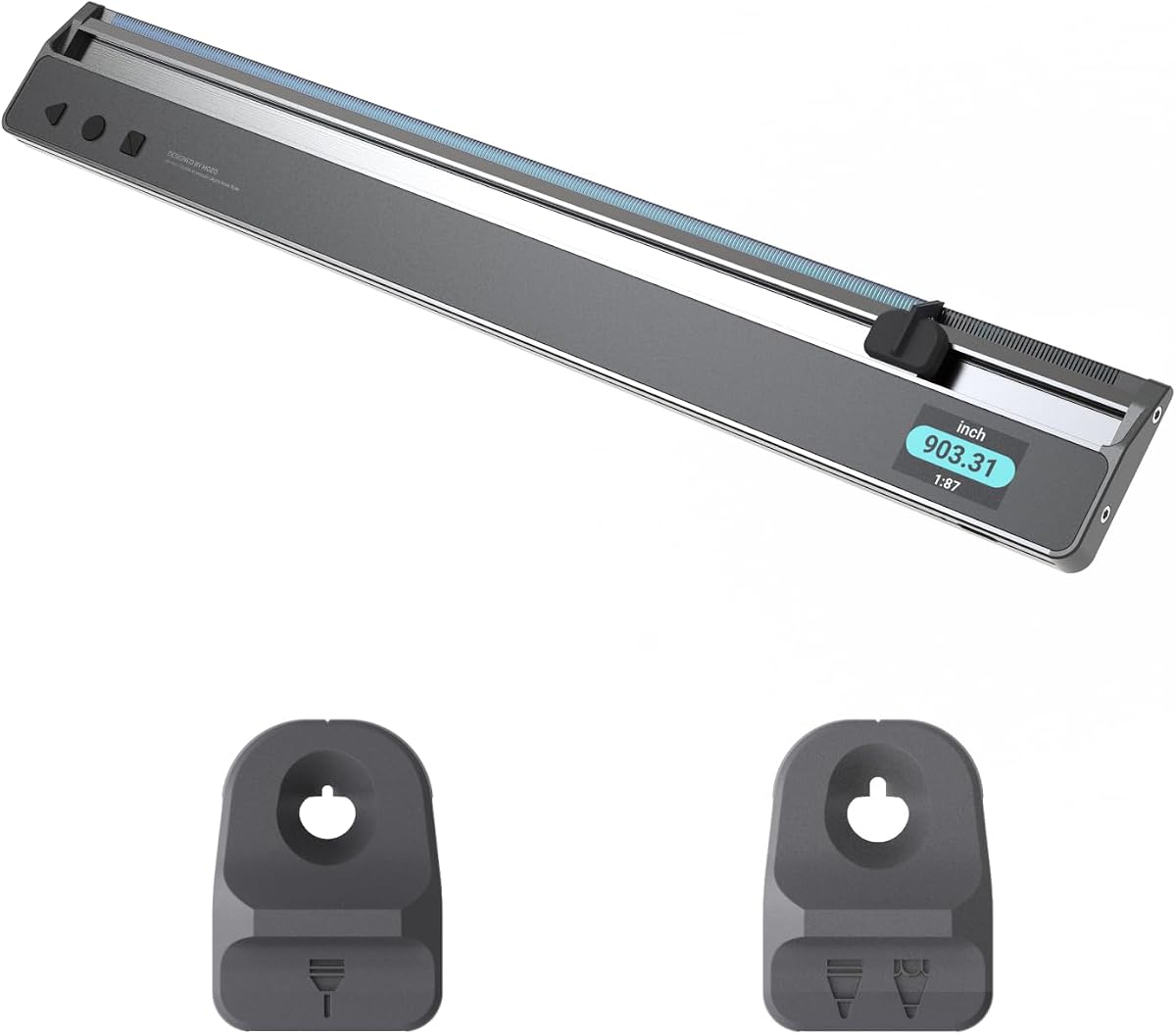


The HOZO NeoRuler is a top choice for modern drafting needs. It stands out with its infinite scale customization and high accuracy. Users love the smart features and app connectivity.
We may earn a commission when you buy through this link, at no additional cost to you.
With 93 built-in scales and the ability to define infinite custom scales, this tool adapts to any project. The accuracy is precise, and the Bluetooth app allows for easy data transfer to CAD files.
While it is more expensive than basic rulers, the efficiency gains are significant. Some users might prefer offline use, but the app integration is seamless for most workflows.
This is the best pick for professionals who need precision and smart features. It bridges the gap between traditional drafting and modern digital workflows perfectly.
You can define unlimited scales for out-of-plan drawings, ensuring accuracy on any blueprint regardless of reduction or enlargement.
The free MEAZOR app via Bluetooth lets you export data to CAD files and manage unlimited scale lists efficiently.
We may earn a commission when you buy through this link, at no additional cost to you.
This traditional ruler offers exceptional value for those needing reliable manual measurements. It is built to last with anodized aluminum and clear laser etched markings. The price is very accessible for students or beginners.
We may earn a commission when you buy through this link, at no additional cost to you.
The triple-sided design covers many common scales, making it versatile for daily use. Laser etched technology ensures the numbers won't fade over time, maintaining accuracy and readability.
It lacks digital features, which might be a downside for some, but it is robust and simple. The imperial-only limitation is standard for this type of tool.
Buy this if you need a sturdy, no-nonsense ruler for standard tasks. It is the best budget choice for students and professionals who prefer manual tools.
Markings are laser etched to prevent fading, ensuring clear visibility and accuracy over years of use.
Multiple scales on three sides provide quick access to common measurements for various drafting needs.
We may earn a commission when you buy through this link, at no additional cost to you.
The Scale Master Pro XE is a robust tool for serious estimators and architects. It offers an extensive library of scales and easy-to-read displays. The build quality is top-tier, designed for jobsite durability.
We may earn a commission when you buy through this link, at no additional cost to you.
With 91 architectural scales and 10 custom scales, it handles almost any plan. The hi-visibility wheel and clear display make taking off measurements straightforward even in low light.
It is a bit heavier due to the construction, but that adds to its durability. Battery dependence is a minor drawback, but the long-life batteries last well.
This is the best premium option for those needing reliability and precision. It is perfect for pros who use a plan measure daily on various sites.
The hi-visibility red wheel and clear display make measurements easy to read in any lighting condition.
With 91 built-in scales and 10 custom slots, it adapts to nearly any architectural or engineering plan.
We may earn a commission when you buy through this link, at no additional cost to you.
This bundle is perfect for detailed reading and measurement tasks. The included NeoMagnifier enhances visibility on tiny plans. It combines smart features with reading aids for a complete solution.
We may earn a commission when you buy through this link, at no additional cost to you.
The 93 built-in scales and Bluetooth app make data management easy. Users rate it highly for its clarity and ease of use on complex drawings with small details.
The magnifier is a key benefit for detail work but adds to the bulk. Some might not need the reading kit if they work on large scale plans.
Choose this if detailed plan reading is your priority. It is an excellent choice for engineers working with intricate or small-scale drawings.
The NeoMagnifier tool allows you to read small text and intricate details with much greater clarity.
Getting the ruler and reading kit together ensures you have all tools needed for detailed plan analysis.
We may earn a commission when you buy through this link, at no additional cost to you.
A reliable manual ruler for those who prefer traditional methods. It is built solid with anodized aluminum for long life. The laser etched marks stay clear even with heavy use in the studio.
We may earn a commission when you buy through this link, at no additional cost to you.
The triple-sided design offers many imperial scales in one tool. This reduces the need to carry multiple rulers for different drawing types, saving space on your desk.
It lacks digital memory features, so calculations must be done manually. For basic drafting, this simplicity is often preferred over complex electronics.
This is ideal for students or draftsmen needing a durable classic tool. It offers excellent value for money with professional-grade quality.
Three sides offer multiple scales in one compact tool, reducing the need for multiple rulers.
Laser etched technology ensures markings remain clear and readable for years of heavy use.
We may earn a commission when you buy through this link, at no additional cost to you.
This bundle offers a complete set for drafting and reading tasks. It includes the digital ruler plus specific kits for drawing and magnification. It is designed to be an all-in-one solution.
We may earn a commission when you buy through this link, at no additional cost to you.
The two penholders accommodate different pen sizes, adding versatility. The NeoMagnifier ensures that fine details are readable. The digital ruler handles the measuring aspect efficiently.
Ratings are mixed, which might suggest some users found the bundle too complex. There are more items to carry around, which could be a downside for mobility.
Buy this if you want all drafting tools in one place. It is suitable for those setting up a complete workstation for precision work.
Included penholders and drafting tools ensure you have everything needed for precise line work.
The NeoMagnifier and pointer allow for detailed inspection of blueprints without strain.
We may earn a commission when you buy through this link, at no additional cost to you.
A great set for users who need both architectural and engineering scales. The included steel ruler adds straight-edge precision. Laser-etched marks ensure high contrast and clear readings.
We may earn a commission when you buy through this link, at no additional cost to you.
The set covers various projects without needing extra purchases. The contrast is excellent for readability on white blueprints. The durability matches the high expectations for professional use.
Managing three rulers can be cumbersome if you travel often. It is heavier than a single digital unit, so consider portability.
This set is perfect for students needing variety in one package. It offers reliable tools for both architectural and engineering measurements.
Clear white graduations on black or blue rulers ensure easy reading in any light.
One set covers architectural, engineering, and straight-edge tasks without switching tools.
We may earn a commission when you buy through this link, at no additional cost to you.
This bundle targets professionals focused on precision drafting and drawing. The penholders fit standard sizes for flexibility. The digital ruler ensures measurements are accurate and recorded digitally.
We may earn a commission when you buy through this link, at no additional cost to you.
The smart features allow you to save work to CAD files. This integration is great for keeping track of changes or project history efficiently.
As a newer product, detailed reviews are still emerging. Some users may need time to adapt to the app workflow.
Choose this for a drafting-focused setup with digital tracking. It is best for designers who value precision and digital organization.
Designed for engineering and design tasks requiring high accuracy in every stroke.
Export to CAD files to track changes and share project data easily with clients.
We may earn a commission when you buy through this link, at no additional cost to you.
This kit is designed for those who need protection and organization for their tools. The case keeps everything tidy and safe during transport. It includes essential reading and drafting modules.
We may earn a commission when you buy through this link, at no additional cost to you.
Magnetic storage for modules means you can access tools quickly. The compact design facilitates effortless portability for on-site work. It is a complete solution for traveling pros.
The case adds some weight and bulk. Users should be mindful of carrying weight if moving frequently.
Buy this if organization and protection are top priorities. It is best for field engineers needing a robust and organized workflow.
Store modules securely with magnetic attachment, making them easy to find and use when needed.
The case consolidates the ruler and modules for easy carrying to any project site.
We may earn a commission when you buy through this link, at no additional cost to you.
This bundle gives you two distinct digital measures for various jobs. It combines advanced features with basic take-off tools. The reliability is excellent with strong user ratings.
We may earn a commission when you buy through this link, at no additional cost to you.
One unit handles 91 architectural scales while the other covers 72 built-in. This range ensures you can handle any job without switching tools or recalibrating constantly.
It is a larger investment with two devices to manage. For teams or heavy users, the redundancy and scale variety are worth the cost.
Choose this for professional use with high volume needs. It provides the tools needed for complex and varied estimating workflows.
Access both 72 and 91 built-in scales across two reliable digital tools.
Use both imperial and metric modes to calculate area and volume with high precision.
We may earn a commission when you buy through this link, at no additional cost to you.
Selecting the right ruler requires understanding your specific needs and the environments where you work. Consider the following factors to make an informed choice.
Look for a ruler with enough built-in scales for your projects. Custom scale options are vital for plans that have been reduced or enlarged from their original print.
Choose a model with at least 70 to 100 built-in scales and the ability to save custom scales for future use.
Precision is paramount for structural and architectural work. Digital tools often provide higher accuracy than manual rulers but check the tolerance ratings carefully.
Prioritize devices with explicit accuracy claims like ±0.004 inch to ensure your estimates are reliable.
Since these tools are used in varied environments, durability is key. Aluminum alloy and reinforced wheels withstand drops and wear better than plastic alternatives.
Select a ruler with a solid metal frame or reinforced components to prevent breakage on busy job sites.
A clear display is essential for quick reading. Look for high-contrast screens that are easy to read in bright sunlight or dim office conditions.
Ensure the display size is large enough to see measurements and calculations without squinting during long sessions.
Modern digital rulers often offer app connectivity for data export. This feature is invaluable for saving takeoffs and transferring data to CAD software automatically.
If you work digitally, choose a model with Bluetooth and an accompanying app for seamless workflow integration.
Digital tools rely on batteries, so battery life matters for uninterrupted work. Some models offer rechargeable options while others use standard replaceable batteries.
Opt for a device with long battery life or rechargeable features to minimize downtime during critical measurement tasks.
Portability is a major factor if you travel between sites. Lightweight designs reduce fatigue when carrying tools over long periods or distances.
Consider the overall weight and dimensions of the ruler to ensure it fits comfortably in your tool bag or case.
Some bundles include reading kits or magnifiers for detailed drafting. These accessories can enhance functionality but may add to the bulk and cost of the package.
Decide if you need extra tools like magnifiers or penholders before purchasing a bundle to avoid unnecessary expense.
To get accurate readings, start by calibrating the device if necessary. For digital tools, enter the correct scale factor based on your blueprint legend before measuring.
When rolling a digital plan measure, keep the wheel flat against the surface to avoid errors. Roll smoothly without lifting the wheel to ensure consistent tracking.
Store the ruler in a protective case to prevent dust and damage. Clean the wheel or surface with a soft cloth regularly to remove debris that affects accuracy.
It is a tool used by architects and engineers to measure distances on scaled drawings. Digital versions calculate measurements automatically and convert them to real-world dimensions instantly.
Most digital measures require you to define a custom scale. Measure a known distance on the plan and input that value so the device adjusts its internal scale factor accordingly.
Yes, most models support both systems. You can switch between feet, inches, meters, and millimeters to match the units used on your blueprints.
Ensure the surface is clean and the wheel is not worn out. Using a slightly textured surface or applying gentle pressure can improve traction for accurate readings.
Most digital models are not fully waterproof. Keep them away from water and moisture to protect the internal electronics and display from damage.
Battery life varies by model but many last for hundreds of hours. Replace or recharge batteries as soon as the display dims to ensure consistent accuracy.
We have explored ten top models ranging from traditional manual rulers to advanced smart digital tools. Each offers unique features suited for different drafting needs.
Consider your specific workflow requirements such as digital export or simple manual use. Prioritize accuracy and durability to ensure long-term value.
Check current listings for the best deals and compatibility with your existing tools. Make sure the price and features align with your professional needs today.