
SteelSeries Apex 3 Gaming Keyboard – Black
4.6Editor score
IP32 water resistant protection
10-zone RGB illumination effects
Whisper quiet gaming switches
We compare the best Mac gaming keyboards to help you find the right mechanical wireless or wired option for your macOS setup.
Finding the perfect Mac gaming keyboard means balancing macOS compatibility with the performance you need for gaming. Not every mechanical keyboard works well with Apple systems, so choosing wisely matters for smooth typing and gameplay.
This guide reviews ten top options across different budgets and layouts. We examined wireless connectivity, key switch types, build quality, and software support to ensure each pick fits Mac users and gamers effectively.
Each pick highlights standout features and real-world performance. Prices and availability change often, so always verify the latest details before buying. Read on to discover which keyboard fits your gaming and work needs best.
4.6Editor score
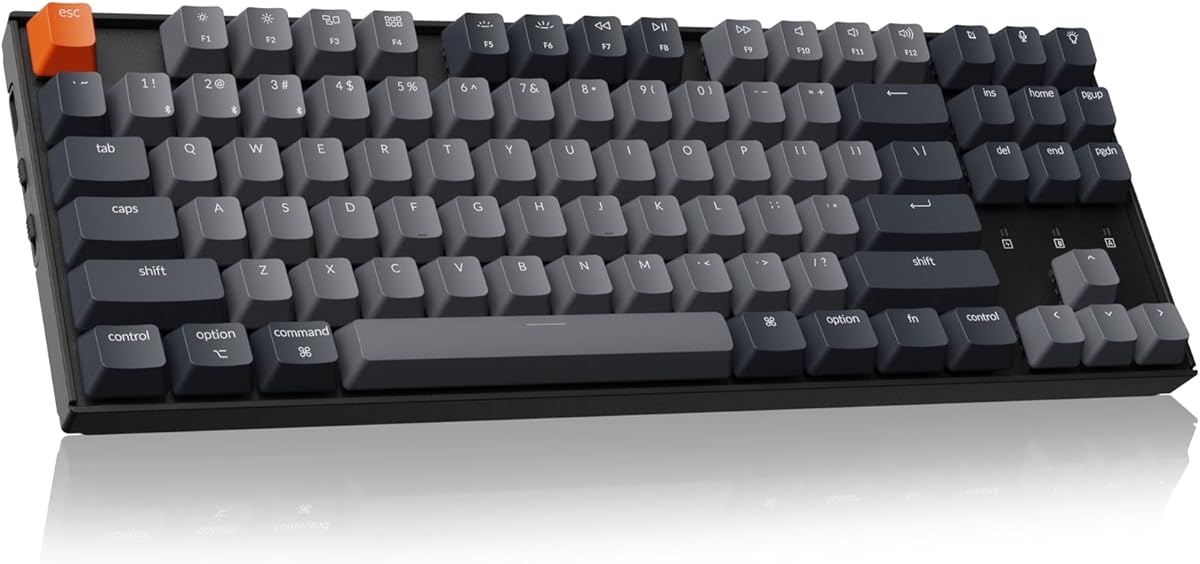
4.3Editor score

4.6Editor score
The following table compares all ten keyboards by key specifications to help you choose quickly. Each entry includes the model name, image, direct link, and essential specs derived from product details.
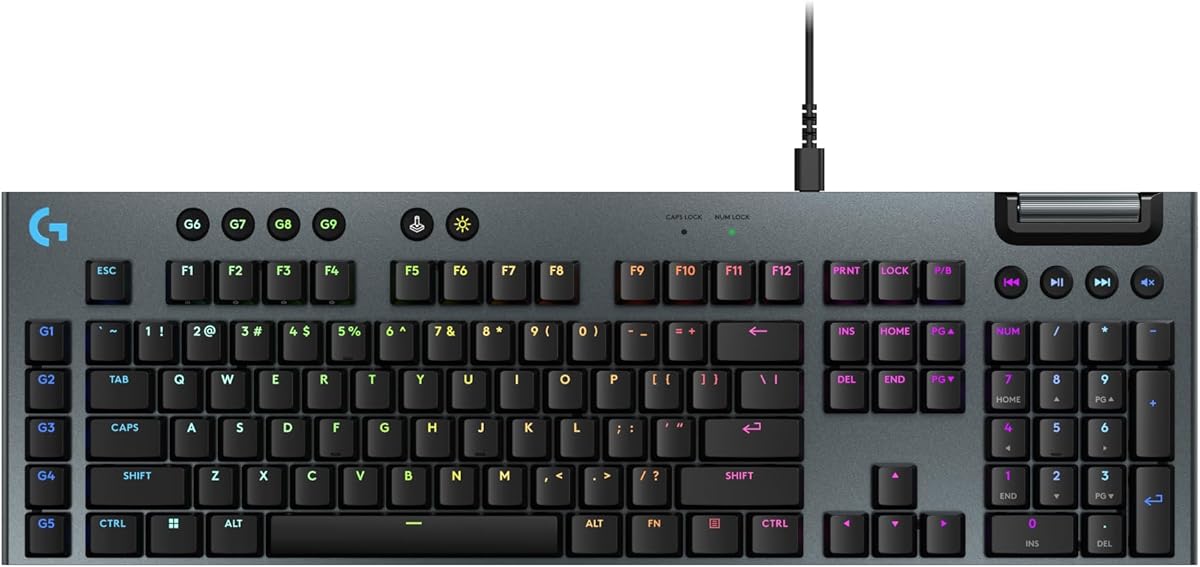


The Keychron K8 stands out as an excellent choice for Mac users who also game. With a strong rating, it balances productivity and performance. Its Bluetooth wireless and wired modes provide flexibility for any setup.
We may earn a commission when you buy through this link, at no additional cost to you.
This keyboard is optimized for both macOS and Windows, including extra keycaps for easy switching. The tactile brown switches offer satisfying feedback for typing and gaming. Its 80% layout gives direct access to navigation keys without sacrificing much desk space.
While it supports up to three devices via Bluetooth, wireless N-key rollover is limited to six keys. The wired mode supports full N-key rollover which is essential for intense gaming. This trade-off is acceptable given its versatility and battery life.
Anyone who needs a reliable mechanical keyboard for work and gaming should consider this model. Its large battery ensures it lasts for months on a single charge. It remains one of the top picks for Mac gaming keyboards.
This keyboard includes dedicated multimedia and function keys for both systems along with extra keycaps to match either OS layout seamlessly.
You can connect up to three devices via Bluetooth 5.1 for seamless switching or use the reliable USB Type-C wired mode for gaming.
We may earn a commission when you buy through this link, at no additional cost to you.
The SteelSeries Apex 3 offers a budget-friendly way to enter gaming keyboards while maintaining durability. Its IP32 water resistance protects against spills making it safe for daily use. The whisper-quiet switches are ideal for shared spaces.
We may earn a commission when you buy through this link, at no additional cost to you.
RGB illumination across ten zones adds style without breaking the bank. The magnetic wrist rest provides full palm support to reduce fatigue. It works with Mac OS X alongside other platforms ensuring compatibility for most users.
Though it uses membrane switches instead of mechanical ones, the response time is sufficient for casual gaming. Some users may prefer the tactile feel of mechanical switches but the quiet operation is a welcome feature for many.
This keyboard is perfect for those seeking value and durability on a tight budget. It delivers reliable performance and comfort without requiring expensive repairs or replacements. It remains a top budget pick for Mac gaming setups.
With IP32 water resistance, the keyboard can withstand accidental spills ensuring long life even in messy environments.
Dedicated multimedia controls let you adjust volume and settings on the fly while the magnetic wrist rest provides ergonomic comfort.
We may earn a commission when you buy through this link, at no additional cost to you.
The EPOMAKER X Aula F75 MAX combines premium design with advanced functionality for serious gamers. Its compact 75% layout frees desk space while retaining essential keys. The TFT screen offers intuitive control for brightness and settings.
We may earn a commission when you buy through this link, at no additional cost to you.
Gasket-mount structure and hot-swappable switches allow customization to suit personal preferences. The creamy sound from tuned switches enhances typing satisfaction. It supports wireless and wired modes ensuring stable performance during critical game moments.
While the software offers extensive customization, beginners might find it overwhelming at first. The higher price reflects its premium build and features. For those willing to invest, it delivers exceptional value and performance.
This keyboard suits users who want top-tier build quality and customization options. Its compatibility with Mac and Linux makes it versatile for various environments. It stands out as a premium choice for Mac gaming keyboards.
The Gasket-Mount structure separates the PCB from the shell to eliminate harsh bottom-out and reduce wrist strain during long sessions.
Hot-swappable switches and foam padding allow users to tweak sound and feel while the TFT screen makes RGB adjustments easier than ever.
We may earn a commission when you buy through this link, at no additional cost to you.
The Logitech G915 X brings next-gen engineering to gaming keyboards with a sleek design. Its low-profile switches reduce fatigue and increase speed for faster gameplay. The sand-blasted aluminum plate adds durability and a premium feel.
We may earn a commission when you buy through this link, at no additional cost to you.
RGB customization syncs across other Logitech G gear creating a cohesive setup. Nine advanced G keys and a volume roller give intuitive control over games and apps. The keymapping software allows detailed personalization of commands.
Some users may find the full-size layout takes up significant desk space. The price is higher than many competitors but justified by its build quality and features. It is ideal for those seeking top performance.
This keyboard is great for gamers who prioritize speed and customization. Its modern design fits well in minimalist setups. It remains a strong contender in the Mac gaming keyboard market.
With a 1.3mm actuation point and 3.2mm travel distance, the GL switches boost APM rates and reduce finger fatigue.
Double-shot PBT keycaps and a sand-blasted aluminum top plate ensure durability while enhancing the aesthetic appeal.
We may earn a commission when you buy through this link, at no additional cost to you.
The Logitech G413 TKL SE balances durability and performance for gamers seeking a tenkeyless keyboard. Its PBT keycaps resist heat and wear ensuring a long lifespan. The tactile switches provide reliable feedback for both typing and gaming.
We may earn a commission when you buy through this link, at no additional cost to you.
The brushed aluminum-magnesium alloy top case reduces flex and adds a sleek look. Six-key rollover anti-ghosting ensures accurate inputs during complex key combos. Media controls via function keys allow easy volume adjustments.
While it lacks RGB lighting, the white LED is sufficient for visibility in dim environments. The limited software customization is a drawback for advanced users but acceptable for straightforward gaming. It remains a reliable choice.
This keyboard suits users who value build quality and simplicity over extensive customization. Its compact layout saves desk space while retaining essential keys. It is a solid option for Mac gaming keyboard needs.
PBT keycaps offer superior resistance to wear and heat compared to ABS plastic ensuring long-term texture and shine.
The minimal flex design ensures stability during intense gaming sessions while the white LED backlight provides clear visibility.
We may earn a commission when you buy through this link, at no additional cost to you.
The Redragon K742 offers a compact design with a volume knob and tri-mode connectivity for seamless switching. Its gasket structure absorbs sound and vibration creating a satisfying typing experience. The hot-swappable PCB allows easy switch customization.
We may earn a commission when you buy through this link, at no additional cost to you.
Support for QMK/VIA provides advanced customization for power users. The large battery supports long hours of use with or without backlighting. Media shortcuts ensure easy control over volume across multiple devices.
Users may need to contact the manufacturer for the JSON file needed for VIA support. While this adds a small step, the flexibility gained is worth it. The design saves desk space without sacrificing features.
This keyboard is ideal for users who want a balance of productivity and gaming capabilities. Its compatibility across platforms ensures versatility. It stands out as a strong choice for Mac gaming keyboards.
Five-layer sound-absorbing paddings and RPC linear switches deliver creamy keystrokes that reduce fatigue during long sessions.
Tri-mode connectivity allows switching between three devices while the dedicated volume knob offers precise media control.
We may earn a commission when you buy through this link, at no additional cost to you.
The Keychron K4 combines a compact layout with a number pad for maximum productivity. Its 96% design saves space while keeping essential navigation and number keys. The Bluetooth 5.1 connection supports switching between three devices seamlessly.
We may earn a commission when you buy through this link, at no additional cost to you.
With a 4000 mAh battery, it lasts up to 240 hours with backlight disabled. The Super Brown switches offer a 50 million click lifespan for reliability. The white LED backlight syncs with your mood through static or flashing modes.
Wireless N-key rollover is limited to six keys but full support is available in wired mode. This trade-off is acceptable for mixed work and gaming use. The keyboard offers a great balance for hybrid setups.
This keyboard is perfect for users who need both productivity and gaming features in one device. Its Mac compatibility ensures seamless integration with Apple devices. It remains a top contender for Mac gaming keyboards.
The 96% layout packs a number pad into a compact design ideal for both spreadsheet work and gaming.
With a 4000 mAh battery, the K4 can last up to 240 hours ensuring you work for months without recharging.
We may earn a commission when you buy through this link, at no additional cost to you.
The Logitech MX Mechanical is a tactile quiet mechanical keyboard that blends productivity with light gaming. Its low-profile keys offer comfort and precision for extended typing sessions. Smart illumination adjusts lighting based on your hand movement.
We may earn a commission when you buy through this link, at no additional cost to you.
Logi Options+ software enables Flow cross-computer control for seamless workflow across devices. The USB-C quick charging supports up to 15 days of use on a full charge. Multi-device pairing ensures easy switching between computers.
While it lacks the speed of dedicated gaming keyboards, it is ideal for users who work and game on one device. The quiet switches make it suitable for shared offices. It is a premium choice for hybrid setups.
This keyboard suits professionals who want mechanical feel without loud noise. Its design prioritizes ergonomics and workflow efficiency. It stands as a strong option for Mac users seeking versatile keyboards.
Keys light up when hands approach and adjust brightness automatically for changing light conditions ensuring clear visibility.
Flow support lets you copy text across computers and control multiple devices with one keyboard improving workflow significantly.
We may earn a commission when you buy through this link, at no additional cost to you.
The GravaStar Mercury K1 features a futuristic aluminum exoskeleton and custom linear switches for a premium feel. The gasket-mounted structure absorbs vibrations providing a comfortable typing experience. Its RGB lighting supports 13 customizable modes for personalization.
We may earn a commission when you buy through this link, at no additional cost to you.
Tri-mode connectivity includes wired USB-C and two wireless options for versatile setup. The switches offer a smooth 40gf actuation force and quick pre-travel. It supports both Windows and Mac systems ensuring wide compatibility.
The design is bold and may not suit every aesthetic preference. Software personalization exists but is less flexible compared to open-source solutions. Despite this, the build quality and sound make it a standout option.
This keyboard is perfect for users who value aesthetics and sound. Its compact layout and tri-mode support make it versatile. It remains a strong choice for Mac gaming keyboard enthusiasts.
A unique aluminum alloy exoskeleton combines strength and lightness with a flowing curve design that offers symmetrical stability.
Five layers of foam and a flexible plate absorb vibrations reducing noise for a comfortable typing experience during long sessions.
We may earn a commission when you buy through this link, at no additional cost to you.
The Logitech G213 Prodigy offers a full-sized design with durable construction to repel liquids and crumbs. Its anti-ghosting gaming matrix ensures responsive feedback for gaming. Five lighting zones allow customization to match your setup.
We may earn a commission when you buy through this link, at no additional cost to you.
Dedicated media controls make music playback and volume adjustments seamless. The integrated palm rest and adjustable feet provide comfort during long sessions. G HUB software lets you customize lighting and macros easily.
While the switches are not mechanical, they deliver tactile feedback suitable for most gamers. The RGB sync is limited to other Logitech G devices which can restrict ecosystem expansion. It remains a solid budget option.
This keyboard is ideal for users seeking reliability and comfort on a budget. Its durable build and media controls make it versatile for both work and gaming. It stands out as a great Mac gaming keyboard choice.
Built for gamers of all levels, the G213 resists liquids and dirt ensuring easy cleanup and long-lasting use.
Five customizable lighting zones and an integrated palm rest make long sessions comfortable and visually appealing.
We may earn a commission when you buy through this link, at no additional cost to you.
Choosing a Mac gaming keyboard requires balancing performance, compatibility, and budget. This guide breaks down key factors to help you pick the right model.
Layout determines desk space usage and key access. Full-size includes a numpad useful for data entry. Tenkeyless removes the numpad for more mouse space. Compact layouts like 75% or 60% prioritize portability but may need function layers.
Choose based on whether you use number pads and how much desk space you have available.
Mechanical switches vary in tactile, linear, or clicky feel. Tactile switches provide feedback without loud clicks ideal for shared spaces. Linear switches are smooth and quiet preferred by gamers. Clicky switches offer audible feedback but may disturb others.
Pick switches that match your typing style and environment noise tolerance for best experience.
Wireless options provide clean setups while wired ensure stable low-latency connections. Many keyboards offer tri-mode connectivity including Bluetooth and USB. Check battery life for wireless models to avoid frequent charging.
Decide if you prefer cable stability or wireless flexibility based on your workspace and gaming needs.
Ensure the keyboard supports macOS function keys and shortcuts. Some models include extra keycaps for Apple systems. Software should work smoothly with Mac OS for customization features like RGB and macros.
Verify that the keyboard and its software are optimized for Mac to avoid usability issues.
Materials like aluminum or plastic affect durability and weight. Look for keycaps made from PBT for longevity. Check for spill resistance if you work near drinks or messy environments.
Invest in keyboards with sturdy construction and reliable keycaps to ensure long-term use.
Software support allows remapping keys and macros for personalized workflows. Hot-swappable switches let you change feel without buying new keyboards. RGB lighting customization adds aesthetics to your setup.
Choose models with strong software and hardware customization to fit your unique preferences.
Prices vary widely based on features and build quality. Budget options offer solid performance while premium models provide advanced customization and materials. Determine your spending limit before comparing specific models.
Balance cost against necessary features to get the best value for your setup.
Connect your keyboard via USB-C or Bluetooth pairing to your Mac. Use system preferences to customize key mappings if the software is available. Ensure the firmware is up to date for best performance.
Clean keys regularly with a soft brush or compressed air to remove dust and debris. Wipe surfaces with a slightly damp cloth avoiding harsh chemicals that may damage materials.
Store wireless keyboards in cool dry places to preserve battery life. Replace or recharge batteries as needed and avoid leaving them unused for long periods without charging.
Yes, many mechanical keyboards support macOS out of the box with function key adjustments. Some include extra keycaps for Apple shortcuts. Always check compatibility before purchasing.
Wireless gaming keyboards work well with Mac provided they support low latency modes. Bluetooth or USB dongle options give flexibility. Choose models with strong battery life for uninterrupted sessions.
The best layout depends on your workspace and use. Tenkeyless is popular for gaming as it frees mouse space. Full-size suits users needing number pads regularly.
Most keyboards offer companion software to remap keys for Mac. Use system keyboard settings if software isn't available. Always ensure the keyboard has a dedicated Mac mode toggle.
Noise depends on switch type. Linear and tactile switches are quieter while clicky ones are louder. Consider your environment when choosing to avoid disturbance.
A wrist rest is recommended for long sessions to prevent strain. Some keyboards include magnetic or ergonomic rests. Check comfort and adjust height to fit your setup.
Our top picks highlight the best options across different needs and budgets. The Keychron K8 leads for versatile Mac gaming while the SteelSeries Apex 3 offers excellent value. The EPOMAKER X Aula F75 MAX brings premium features to serious users.
Prioritize switches, layout, and compatibility when making your choice. Consider whether wireless or wired best suits your setup for stability and convenience. Invest in build quality to ensure long-lasting performance.
Prices and availability change frequently so check current listings before buying. This guide remains updated with verified product specs to help you decide confidently. Find your ideal Mac gaming keyboard today.